Change your Minecraft version or server software
Use the Minecraft Version page in the left menu (under Utilities) to change your Minecraft version or switch to different server software.
New Minecraft servers start on Vanilla. This page is how you move to Paper for plugins, or to a mod loader such as Forge, NeoForge, Fabric, or Quilt for mods. If you want a modpack, you can also install one directly. See Install a modpack.
Switch to another version
Section titled “Switch to another version”- Open Minecraft Version in the left menu. The top card shows what you run now, for example Paper, latest.
- Under Forks, pick the software you want and press Browse.
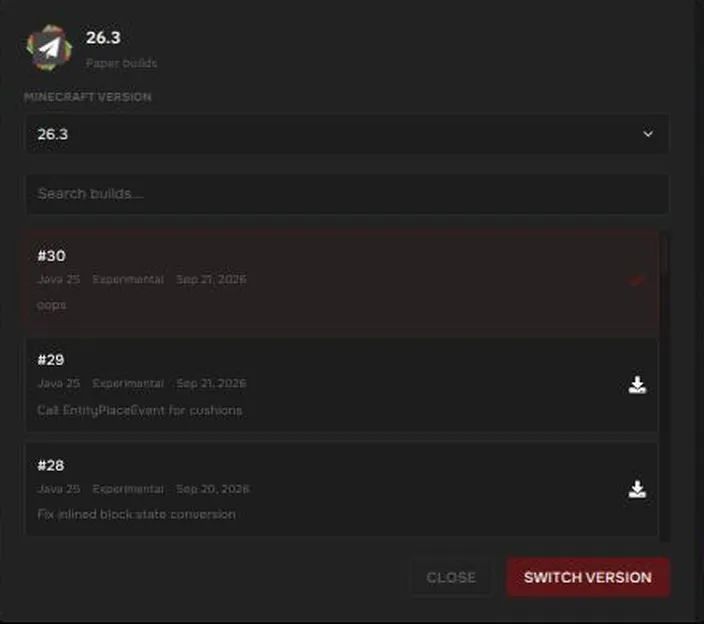
- In the dialog, choose the Minecraft version from the dropdown. Below it is a list of builds. Each build shows the Java version it needs, a Stable or Experimental tag, and a date.
- Choose a build and press Switch Version.
Stable or experimental?
Section titled “Stable or experimental?”- Stable builds are the safe choice for a server people rely on.
- Experimental builds are newer and can break plugins and mods. The newest Minecraft version is often only available as experimental at first.
If a plugin stops working after an update, switch to the latest Stable build of an earlier version.
Choose what happens to your files
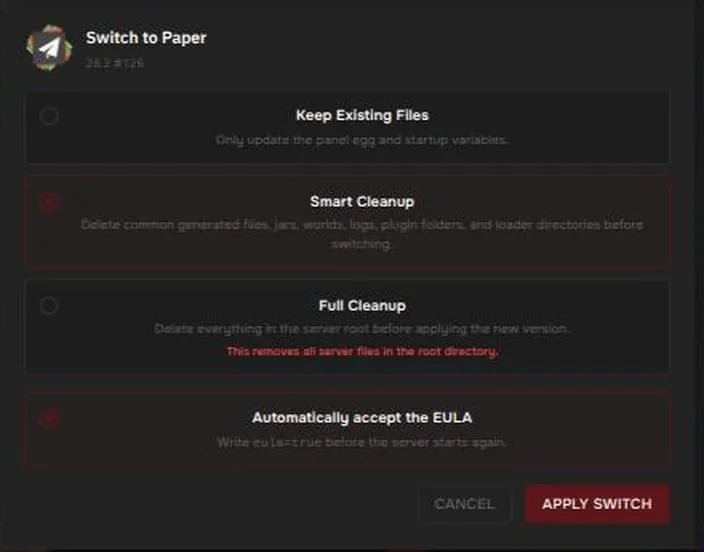
Section titled “Choose what happens to your files”After you press Switch Version, a second dialog asks how to treat your files. The default is Smart Cleanup.
| Option | What it does |
|---|---|
| Keep Existing Files | Only updates the panel software and startup settings. Your world, plugins, and files stay. |
| Smart Cleanup (default) | Deletes common generated files, server jars, worlds, logs, plugin folders, and loader folders before switching. |
| Full Cleanup | Deletes everything in the server root before applying the new version. |
There is also a checkbox, Automatically accept the EULA, which writes eula=true before the server starts again.
Press Apply Switch. A progress bar runs and ends with Starting server.
Which software can I pick?
Section titled “Which software can I pick?”| Software | Type |
|---|---|
| Vanilla | Server software: the official Mojang server. |
| Paper | Server software: fast, runs plugins. |
| Purpur | Server software: Paper-compatible with more options. |
| Spigot | Server software (limited direct build support). |
| Folia | Server software: multithreaded Paper fork. |
| Forge, NeoForge, Fabric, Quilt | Mod loaders. |
Plugins and mods are specific to the type of software, so check that yours still work after you switch. See Minecraft server software.
Java version
Section titled “Java version”Each build lists the Java version it needs. For example, the Minecraft 26 builds we saw need Java 25. The panel picks a matching Java image for you. If a version will not start, you can change the Java version on the Startup page under Docker Image. See Startup settings.
The Startup page also has a version setting
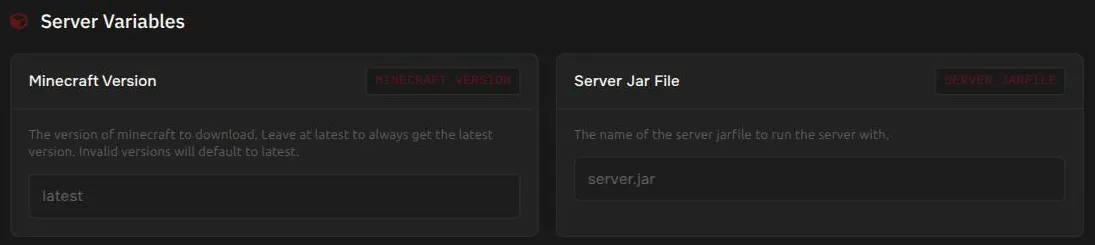
Section titled “The Startup page also has a version setting”On Startup, under Server Variables, Minecraft Version is set to latest by default. latest follows the newest build, including experimental ones. Use the Minecraft Version page above if you want to pin a specific stable version.
Switch software from Settings
Section titled “Switch software from Settings”Settings, then Change Egg, also lets you switch between Minecraft server types, but it does not offer the build list or the cleanup choices. Use the Minecraft Version page when you can.