Templates: one-click setups for plugins and content
Templates installs ready-made setups into your server. Open Templates in the left menu (under Utilities).
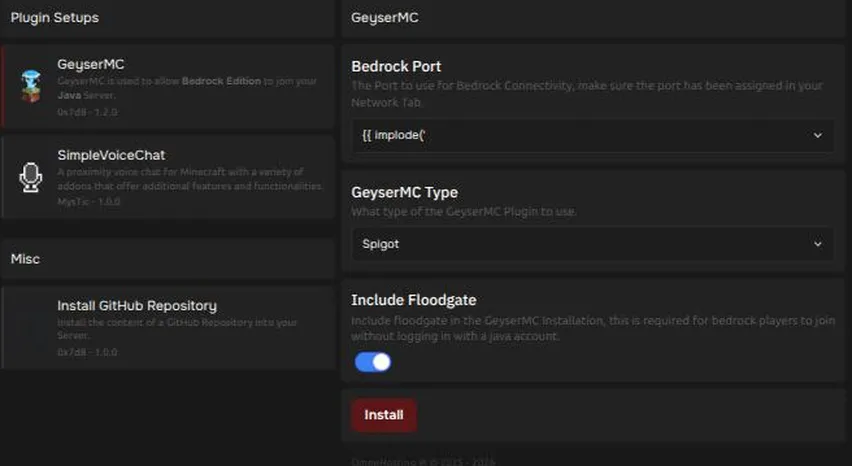
The page has a list of templates on the left. Select one to see its options on the right, then press Install.
What is available
Section titled “What is available”| Template | What it does |
|---|---|
| GeyserMC | Lets Bedrock Edition players join your Java server. Options: your server software (Paper, Spigot, Purpur, Folia, Velocity, BungeeCord, Fabric or NeoForge), the Bedrock port, and whether to include Floodgate. |
| SimpleVoiceChat | A proximity voice chat for Minecraft. Options: your server software (Paper, Spigot, Purpur, Folia, Fabric, Forge or NeoForge), your Minecraft version (mods only), and the voice port. |
| Install GitHub Repository | Installs the contents of a GitHub repository into your server. |
The list can change over time.
Before you install
Section titled “Before you install”- Templates change files on your server, so make a backup first.
- A template only shows for server types it supports. Inside the template, pick the server software you actually run so it installs the right files.
- Restart your server after a template finishes. Geyser and voice chat start when the server starts.
- Installing a template again replaces that plugin’s settings file, so changes you made to it are reset.
- If you installed the same plugin another way (for example from the Plugins page), remove that copy first. Two copies of one plugin can stop it from loading.
Ports for GeyserMC and SimpleVoiceChat
Section titled “Ports for GeyserMC and SimpleVoiceChat”Both templates use a UDP port, and each one needs its own. In the template, pick the port from the list. Only ports assigned to your server are listed.
- Your main port works for one of them, because Java uses it over TCP and these use it over UDP.
- If you install both, give them different ports. Add another on the Network page if you need one.
- The template lists the ports you have right now. If you add a port later, set it by hand in the plugin’s settings. Running the template again also works, but it resets that plugin’s settings file (see above).
Fabric and NeoForge
Section titled “Fabric and NeoForge”- GeyserMC works on Fabric and NeoForge, not Forge. Pick the Minecraft version your server runs. On Fabric the template also installs Fabric API, which Geyser needs. Turn that option off only if Fabric API is already in your
modsfolder. - SimpleVoiceChat works on Fabric, Forge and NeoForge. Mods must match your exact Minecraft version, so pick it from the list.
- Every player also needs the voice chat mod on their own game.
If something does not work
Section titled “If something does not work”- Geyser does not start. Geyser follows the newest Minecraft release a little behind. Use a stable Minecraft version that Geyser supports. See Let Bedrock players join your Java server.
- Voice chat shows no one. Check the voice port is one of your ports and that players have the mod. See Plugin needs an extra port.