Install a Minecraft modpack: Modpacks page guide
Every new Minecraft server starts on Vanilla Minecraft, the plain game with no mods or plugins. From there you can install a modpack, or switch to plugin software such as Paper. This page covers modpacks. For plugins, see Install plugins.
Modpacks are installed from the Modpacks page in the left menu.
Find a modpack
Section titled “Find a modpack”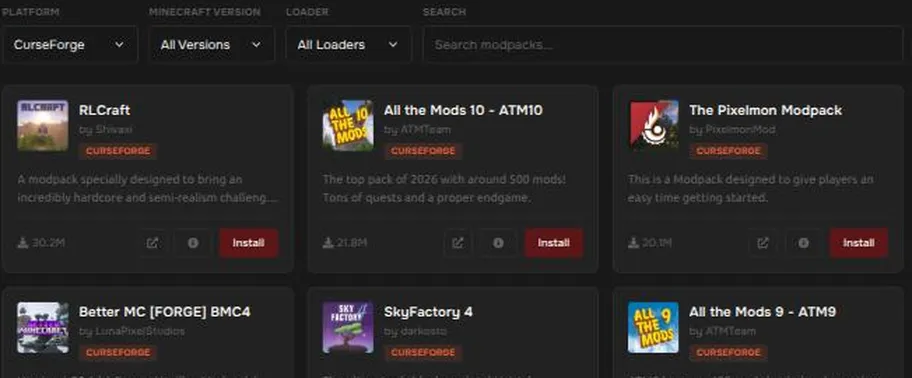
Use the filters at the top:
- Platform: Modrinth, CurseForge, ATLauncher, or Feed The Beast. CurseForge is shown first.
- Minecraft Version: only show packs for a certain version.
- Loader: Forge, NeoForge, Fabric, or Quilt.
- Search: type a name.
Each pack shows its name, author, platform, and download count. The buttons on a card open the pack’s page, show more information, or Install it.
Choose how your files are treated
Section titled “Choose how your files are treated”Press Install. Before it starts, you choose an installation method:
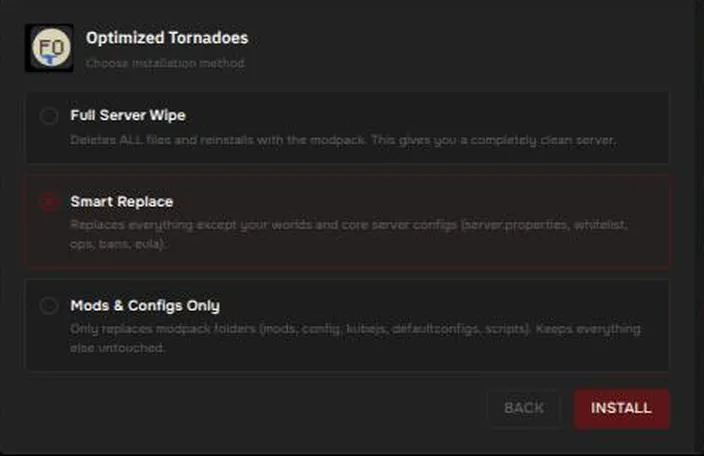
| Method | What it does |
|---|---|
| Full Server Wipe | Deletes all files, then installs the modpack. You get a completely clean server. |
| Smart Replace (default) | Replaces everything except your worlds and core server settings (server.properties, the whitelist, ops, bans, and eula.txt). |
| Mods & Configs Only | Replaces only the modpack’s own folders (mods, config, kubejs, defaultconfigs, scripts) and leaves everything else alone. |
What the installer does for you
Section titled “What the installer does for you”After you press Install, a progress bar shows the steps, for example Downloading modpack files, Applying overrides, and Starting server. In our test the installer also did all of this by itself:
- Switched your server software to the loader the pack needs. The message read
Configured Fabric 0.16.14 automatically by switching to Fabric. - Picked a matching Java version. You do not need to change the Java image.
- Installed the mods. The pack we tested added 53 mods to the
modsfolder. - Accepted the Minecraft EULA by writing
eula=true. - Set the server’s memory limit to match your plan.
- Started the server.
Watch the Console to see it load. The first start of a modpack takes longer than a normal server because it loads every mod.
After installing
Section titled “After installing”The left menu changes to match your new software:
- A Mods page appears, for adding and removing individual mods. See Install mods.
- Plugins is only for plugin software such as Paper. It is not shown on modded servers.
- MCSetups is hidden on modded servers.
You can go back to a plugin server at any time. See Change your Minecraft version and remember to back up first.
If the server does not start
Section titled “If the server does not start”- Open Console and read the last lines. See My server won’t start and Minecraft mod problems.
- Large modpacks use a lot of memory. If the console shows out-of-memory errors, see Server ran out of memory.
- Read the modpack’s own page for its recommended memory and Minecraft version.
- If it still fails, open a ticket and tell us which modpack you installed. See Contact support.